
298 words
1 min read

Update the Offline Address Book in Exchange Server 2013

By · Docker Captain · CNCF Ambassador · IBM Champion
Cover image for the post 'Update the Offline Address Book in Exchange Server 2013'

This article is for those looking for a detailed and clear guide on how to update the offline address book in Exchange Server 2013.

The offline address book is designed so that Microsoft Outlook users can view the address book even when they are not connected to the Exchange server. In addition, offline address books can help reduce the load on Exchange servers.

NOTE

To learn how to create offline address books in Exchange Server 2013, read my guide: Create an Offline Address Book in Exchange Server 2013.

Click “Start”, point to “Exchange” in the search bar, then right-click on “Exchange Management Shell” and select “Run as administrator”.
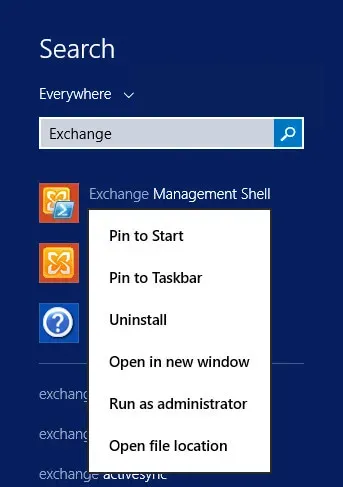
Update the Offline Address Book in Exchange Server 2013 - Step 1

Let’s see the existing schedule for updating address books using the command:

Terminal window
Get-OfflineAddressBook | fl Name,Schedule
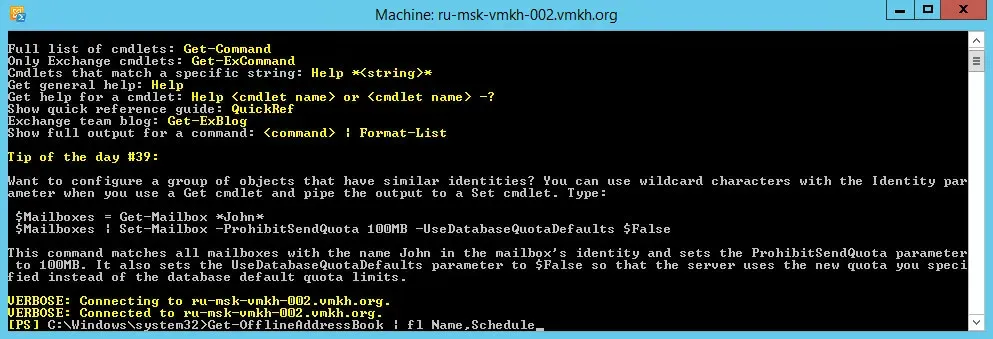
Update the Offline Address Book in Exchange Server 2013 - Step 2

Now let’s check when a specific OAB was last updated using the command:

Terminal window
Get-OfflineAddressBook "VMKH Offline Address Book" | fl Name,LastTouch *
NOTE

This manual uses the “VMKH Offline Address Book” as the main offline address book.
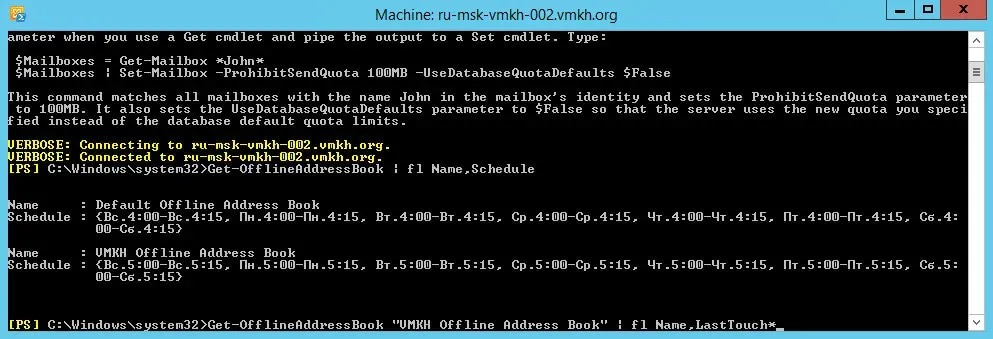
Update the Offline Address Book in Exchange Server 2013 - Step 3

The following commands must be run on all Exchange servers.

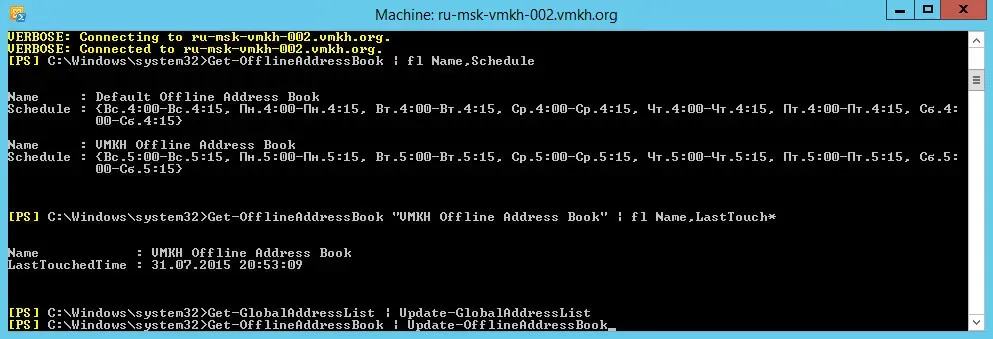
Let’s update the global address list using the command:

Terminal window
Get-GlobalAddressList | Update-GlobalAddressList
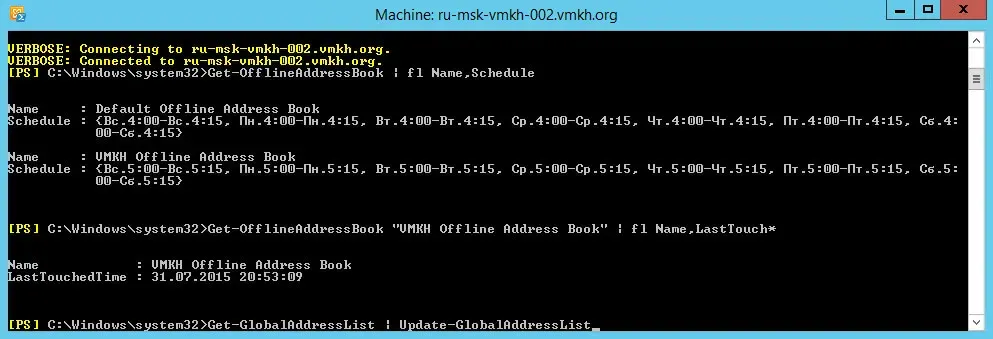
Update the Offline Address Book in Exchange Server 2013 - Step 4

Update the Exchange OAB using the command:

Terminal window
Get-OfflineAddressBook | Update-OfflineAddressBook
Update the Offline Address Book in Exchange Server 2013 - Step 5

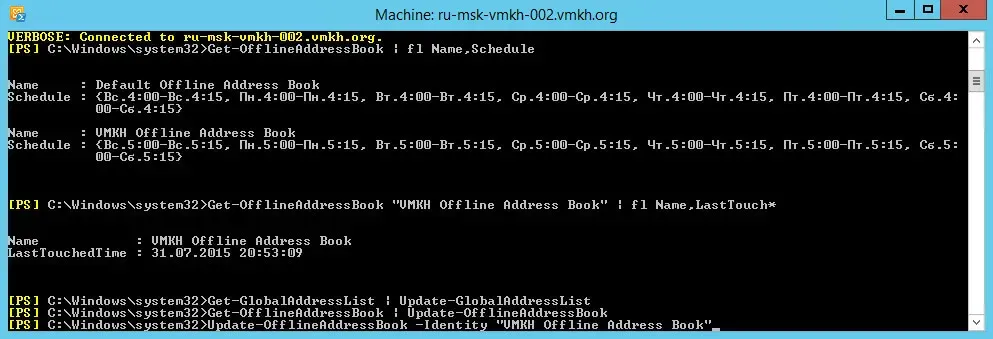
You can update a specific offline address book using the command:

Terminal window
Update-OfflineAddressBook -Identity "VMKH Offline Address Book"
NOTE

This manual uses the “VMKH Offline Address Book” as the main offline address book.
Update the Offline Address Book in Exchange Server 2013 - Step 6

If you have Exchange Server 2010 installed, then to force the update of the offline address book, you will need to run one more command:

Terminal window
Get-ClientAccessServer | Update-FileDistributionService

Vladimir Mikhalev

Docker Captain  ·  CNCF Ambassador  ·  IBM Champion

The Verdict — production-tested analysis on YouTube.

The Verdict

Inconvenient truths about shipping in the AI era

Container security, platform engineering, and the agentic shift — tested in production, argued without the hype. The verdict reaches your inbox the moment there's one worth sending.

Related Posts

Same category
  1. 1
    Recovering a Corrupt Exchange Database with Stellar Repair — Real-World Lab Test
    SysAdmin & IT Pro · We deliberately broke an Exchange 2019 server to test Stellar Repair on a dirty-shutdown EDB file. The recovery process, lab setup, and lessons learned.
  2. 2
    Terminal, Shell, Command Line, Prompt: Four Words, Four Things
    SysAdmin & IT Pro · The terminal is the window, the shell runs your commands, the prompt says it is ready, the command line is the idea. Plain definitions, examples, a cheat sheet.
  3. 3
    Install Ubuntu Server 22.04 LTS
    SysAdmin & IT Pro · Step-by-step guide to install Ubuntu Server 22.04 LTS. Covers language, disk setup, OpenSSH, user creation, and system configuration for beginners.
  4. 4
    Install OTRS on Ubuntu Server
    SysAdmin & IT Pro · Guide to installing OTRS Community Edition on Ubuntu Server — configure PostgreSQL, Apache, and SSL with Let's Encrypt, and launch OTRS securely.

Random Posts

Random
  1. 1
    Master Container Security in 2025 — Best Practices & Live Demo
    DevOps & Cloud · Master container security in 2025 with proven Docker & Kubernetes best practices. Learn how to automate scans using Docker Scout & Snyk with real demos.
  2. 2
    Run a Minecraft Server with Multicraft
    SysAdmin & IT Pro · Learn how to run your own Minecraft server using Multicraft on Ubuntu Server. Step-by-step setup guide for managing players, ports, memory, and Spigot.
  3. 3
    Install Portainer Using Docker Compose
    Self-Hosting · Learn how to install and configure Portainer using Docker Compose with Traefik and Let's Encrypt on Ubuntu Server. Step-by-step container management setup.
  4. 4
    Install GLPI with Docker Compose, Traefik and Let's Encrypt
    Self-Hosting · GLPI asset management and helpdesk behind Traefik with Let's Encrypt: the Docker networks, the compose file from my repository, one command, first login.
Update the Offline Address Book in Exchange Server 2013
https://heyvaldemar.com/update-the-offline-address-book-in-exchange-server-2013/
Author
Vladimir Mikhalev
Published
2015-07-30
Updated
2026-03-23
License
CC BY-NC-SA 4.0